Place pages: what Maps shows about a place
On this page
When you open a place on Maps, its page fills the side panel: what the place is, where it is, when it is open, how to reach it, and what is around it. There are three kinds: a city, town or ZIP code, a business or landmark, and a dropped pin on any spot you choose.
#The buttons on every place page
| Button | What it does |
|---|---|
| Directions | Opens directions with this place as the destination. |
| From here | (Dropped pins.) Opens directions starting here. |
| Save | Keeps the place in your list, in this browser. It turns into Saved; select it again to remove the place. See Save places. |
| Nearby | Shows a row of buttons (restaurants, coffee, gas and more); pick one to search around this place. |
| Share | Copies a link to the place, and to the map as you see it. On a phone it opens your phone's sharing menu. |
| Call | (Businesses with a phone number.) Calls it. |
| Weather | (Cities and towns, on sites with the Weather service.) Opens the forecast for the place. |
#A city, a town or a ZIP code
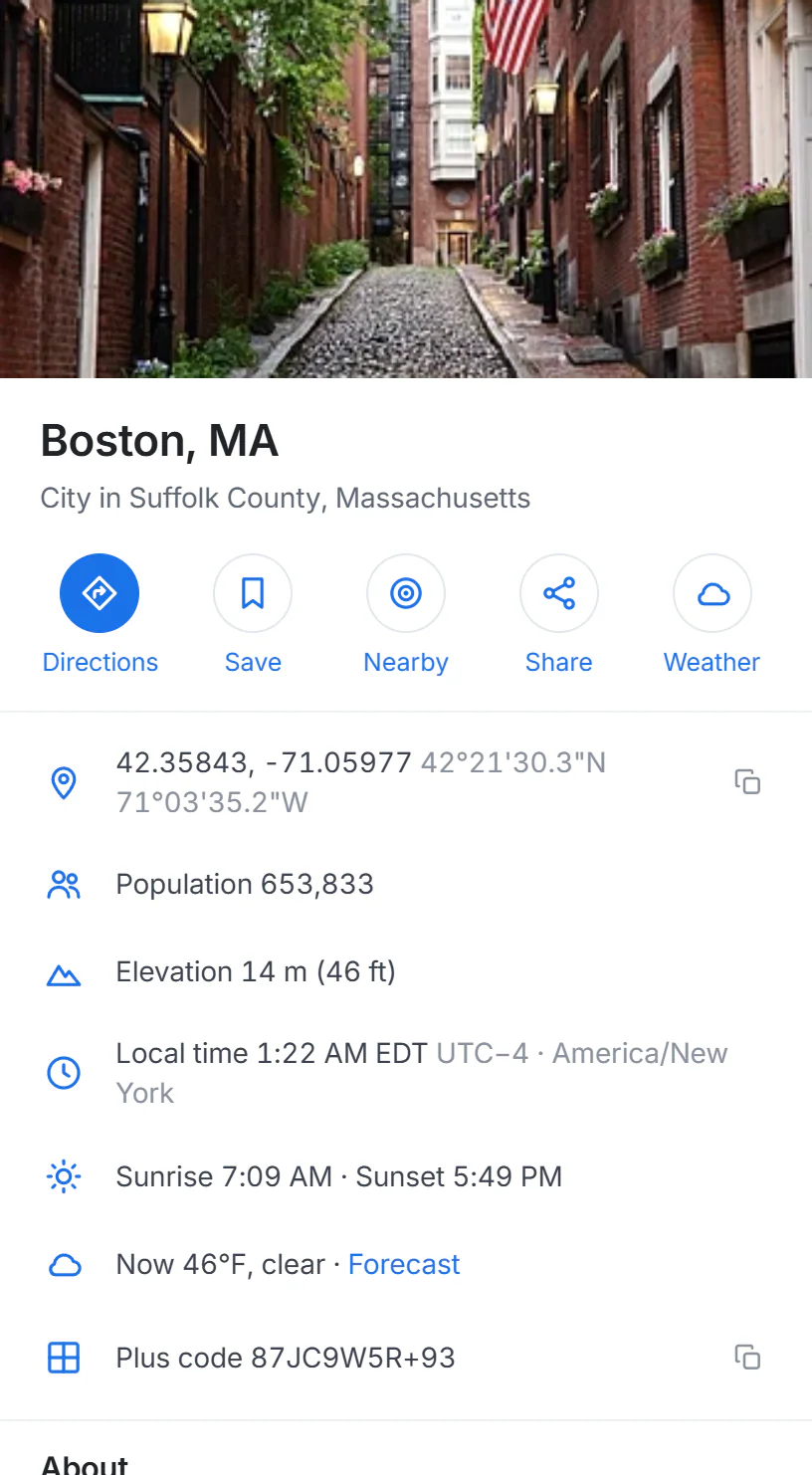
The page for Boston. The local time keeps ticking, and the weather line links to the forecast.
- 1The place and what kind of place it is
- 2Directions, Save, Nearby, Share and Weather
- 3Facts: position, population, elevation, local time, sunrise, weather now
A city's page has:
- A photo and a summary from Wikipedia, when there is one, credited at the bottom of the summary.
- Its position in decimal degrees and in degrees, minutes and seconds, with a button to copy it.
- Population and elevation (in meters and feet).
- The local time and its difference from UTC, which matters when the place is in another time zone, and sunrise and sunset today.
- The weather now, with a link to the full forecast.
- A plus code, a short code for the spot that you can share instead of an address.
- Explore: buttons that search for restaurants, coffee, hotels and more around the place.
- Nearby cities and towns with their distances, and for U.S. cities, the ZIP codes that carry the city's name.
- Street-level photos taken nearby, when there are some (see below).
The map draws the city's outline as a dashed red line. A ZIP code's page has the same facts and says which city the ZIP code is in.
#A business or a landmark
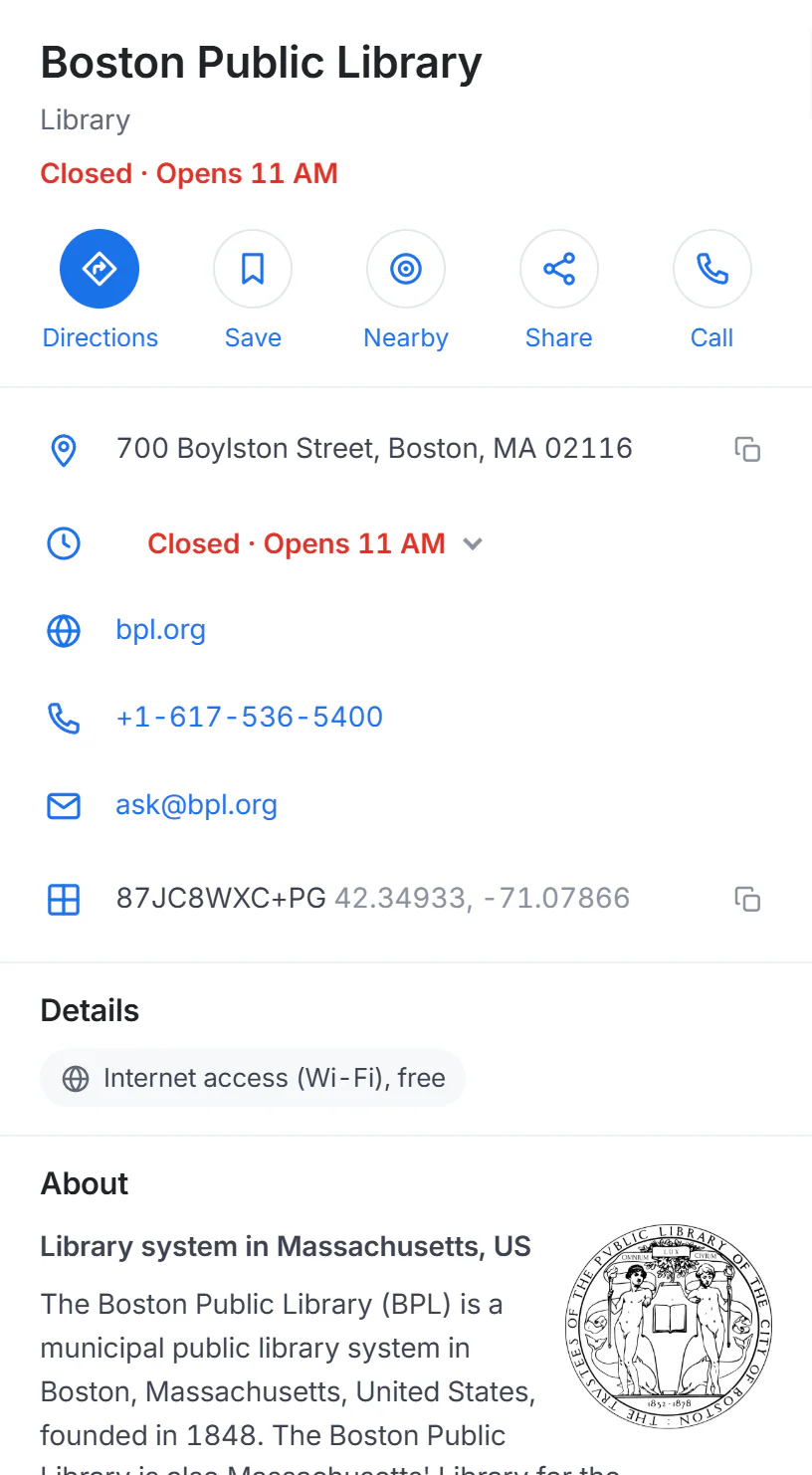
The Boston Public Library. The line under its name says at a glance whether it is open now.
- 1Open now or Closed, and when that changes
- 2Directions, Save, Nearby, Share and Call
- 3Address, hours, website, phone and email, when the map has them
- 4Details: what the place offers
- Open or closed now. When the map has the opening hours, the line under the name says Open · Closes 9 PM, Closes soon, Open 24 hours or Closed · Opens 11 AM, by the place's own local time. Select the hours line to see the whole week, with today marked.
- Address, website, phone and email, as the map has them. Select the copy button beside the address to copy it.
- Details: what the place offers, such as cuisine, wheelchair access, takeout, outdoor seating, free Wi-Fi, the payments it takes, the plugs at an EV charger, or the year it opened.
- About: a summary from Wikipedia, when the place has an article.
- Nearby: buttons that search for restaurants, coffee, hotels, parking, things to do and gas around it.
At the bottom of the page, Edit it and leave a note open OpenStreetMap, where anyone can correct a wrong address or missing hours. Corrections reach Maps after a while, not at once.
#A dropped pin
Right-click any spot on the map (or press and hold it on a touch screen) and choose What's here?. A red pin drops there and the panel shows:
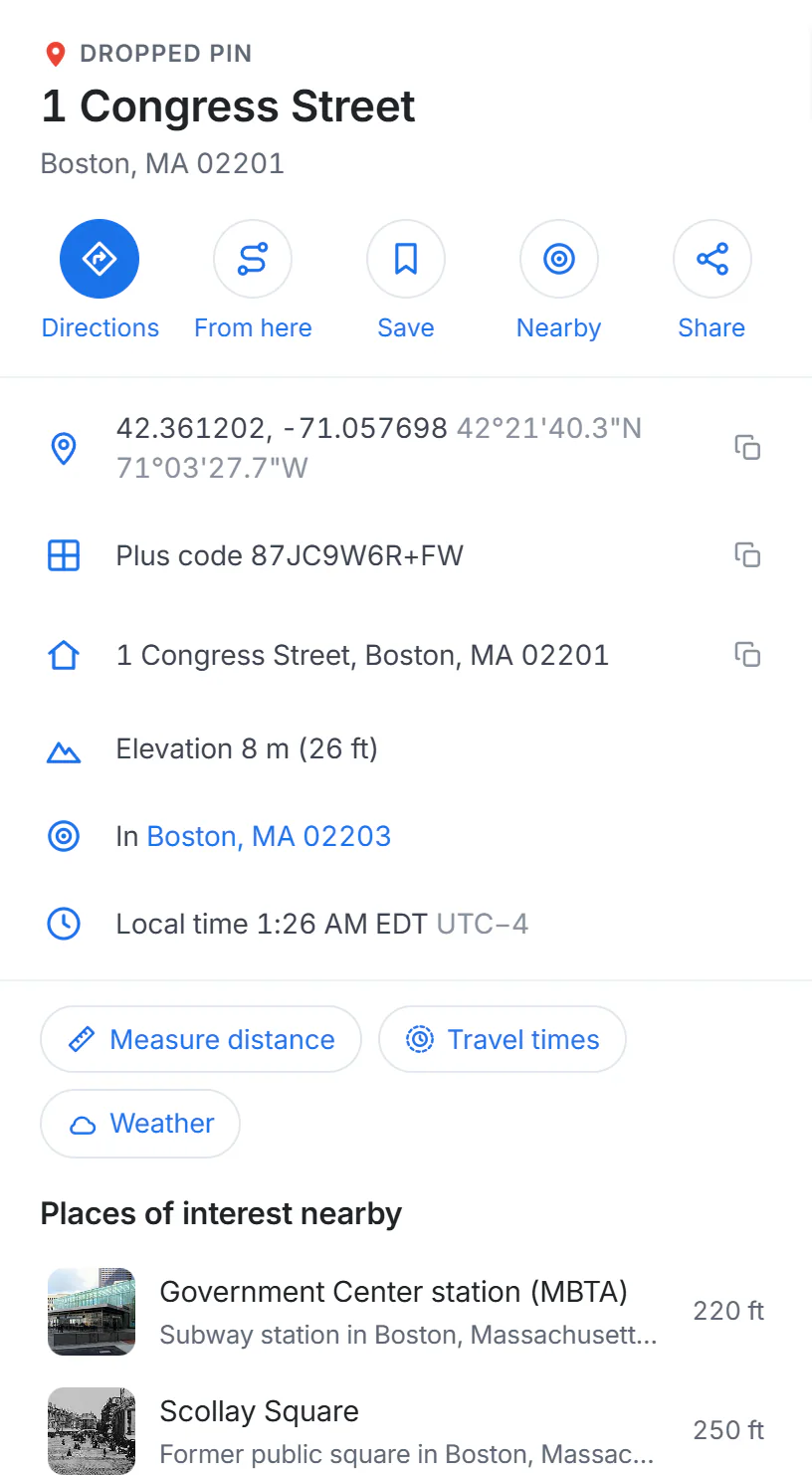
What's here: the street address of the spot, its plus code, its height, the nearest town and the local time.
- 1A dropped pin or the place found at this spot
- 2Directions to or from here, Save, Nearby, Share
- 3Plus code: a short code for this exact spot
- 4Measure distance and Travel times
- The street address of the spot, or the name of the business there with a link to its full page.
- Its coordinates and plus code, each with a copy button.
- Its elevation, the nearest town with its distance and direction, and the local time.
- Measure distance and Travel times from this spot, and Weather for the nearest town.
- Places of interest nearby: Wikipedia articles about places within walking distance, with photos.
The pin also travels in the page's address, so a link copied with Share opens the same pin. How much detail you get depends on how far you were zoomed in: a click on a whole country names the country, a click on a street names the house.
#Street-level photos
Many place pages end with a strip of street-level photos taken nearby by contributors to Panoramax, a free and open photo collection. Photos marked 360° are panoramas.
- Select a photo to open it full screen.
- In a 360° photo, drag to look around, or use the ← and → keys; scroll to zoom.
- The arrow buttons step to the previous and next photo in the same series, usually the next few meters along the street.
- The pin button closes the photo and shows the spot on the map; Esc or the close button returns you to the page.
Each photo is credited to its author with its licence. To see where photos exist, use the Street-level photos map.
#Common questions
Why does a place have no hours or phone number?
Its page shows only what OpenStreetMap volunteers have recorded. Many small businesses have a name and an address but no hours yet.
Are the hours always right?
No. They are as current as the last volunteer edit. Check the place's own website, or call, before a long trip.
Why is the local time different from my clock?
It is the time where the place is. A place in another time zone shows its own time and its difference from UTC.
Can I copy the coordinates in another format?
The page shows decimal degrees (42.35843, -71.05977) and degrees, minutes and seconds. The copy button copies the decimal form, which almost every map and GPS device accepts.
Why is there no photo of the place?
The photo at the top comes from Wikipedia or Wikimedia Commons, and only places with one there show it.